
QNews
Edition #20
Product updates
QFloors 9.025 Brings Additional Features

By Chad Ogden | Founder
I’m excited to announce we have recently released a new version (Pre-release Version 9.025) of QFloors that contains some cool integration options that will excite many of you. QFloors 9.025 features three new integrations for website companies or CRM’s that are collecting and tracking leads. You can now track Return on Advertising dollars better, and sync product information from QFloors with your company website. Here are the details:
- We have enhanced our Swell integration to give users more control over when you send requests for google reviews. For instance, if an installation was pushed back for some reason, you can adjust the automated text request back as well. You can customize when you would like messages from Swell to go out to your customer. This new feature gives you more options and more flexibility when communicating with customers.
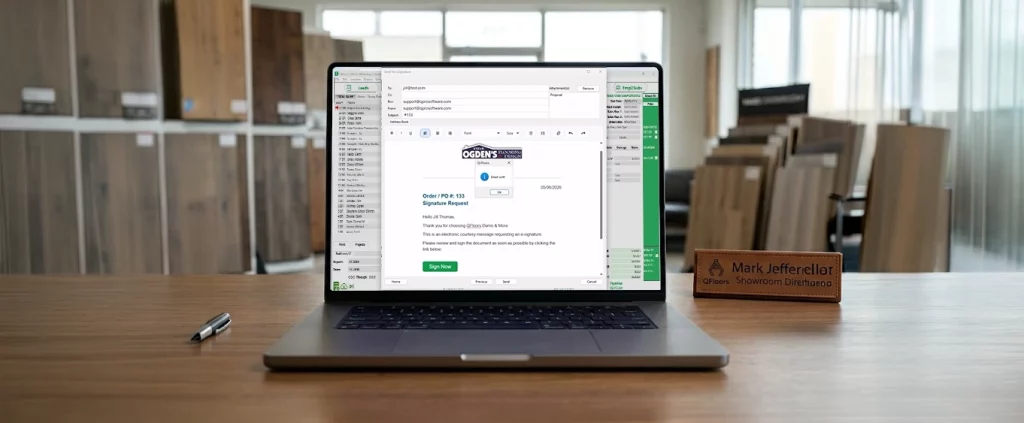
- We’re working on automated website product catalogs so you can easily update pricing, availability, stock quantities, etc., and it can be seen in close to real time by potential customers. So basically, you control which products are appearing on your website and what information is included with them, and you do it from your QFloors. See the video below for an example of how this works.
- We’ve also enhanced our leads integration to where you can not only download leads from your website, CRM, or other lead-generating site, but you can synchronize all of your leads. For instance, you can include walk-ins, referrals, etc. and share that with a 3rd party software. Which means you are seeing, tracking, and measuring ALL of your leads, not just those from a website. With this integration, you can trigger events like sending a professional marketing email to the prospect. And if an installation date changes, you can communicate that to the 3rd party software so automated messaging will update accordingly.
In a recent webinar that QFloors hosted, Mobile Marketing CEO Carole Cross and I talked a bit about some of the integration options. Here’s a link to that webinar. If you don’t want to watch the whole webinar, you can skip to 23:11 for the demonstration.
The features are ready and there in QFloors for whatever third-party software would like to integrate with us, but as mentioned, the company taking the fullest advantage of these features is Mobile Marketing. They’ve been quite proactive in bringing these features to our customers.
Finally, on a parting note I wanted to share a recent Success Story. We had a customer who was concerned with the increase in their QFloors maintenance fees. We suggested that they take a look at our QPay credit card processing option, to see if it could save them any money. It turns out that the amount of savings they will now realize in their credit card fees each month, using QPay, not only covered the increased maintenance cost, but completely covered their entire maintenance fees. It was a no-brainer. So if you haven’t already looked into whether QPay will save you money, you ought to, right away. While not every customer will realize the same level of savings (it depends on your rates and fees), a lot of our customers who have switched report that they’re saving a ton. Plus, we’re also being told that the integration between QPay and QFloors has brought customers a huge benefit that they were not getting with other credit card processors. So it’s something you might want to look into. Reach out to steve@qprosoftware.com or call our sales team at 801-563-0140, option 4.
Product updates
Introducing QPay Later – Buy Now, Pay Later Financing for Your Customers

By Trent Ogden | Senior Director, Finance
QPay Later is an exciting new customer financing offering from QFloors!
Most of you know about, and many of you already use, QPay. QPay is QFloors’ integrated credit card payment processing. It allows you to charge a card, tokenize a card (for future processing), charge a customer’s bank account directly through eCheck (ACH) processing, or send a request for payment that a customer can initiate on a secure website. With QPay you can access all those features right from the Sales Order payment window inside QFloors.
We are happy to announce that we are introducing a new customer payment option. QPay Later is QFloors’ BNPL (Buy Now Pay Later) flooring financing option, and it will work right alongside QPay. (Note: Currently, QPay Later is available as a stand-alone product but will eventually be integrated into QFloors’ payment window next year.)
Most of you already use consumer financing through banks or other lending institutions to supplement your customer payment options. BNPL is becoming a larger chunk of consumer payment dollars at the expense of credit card payments. In 2019, 50% of all consumer spending came through credit card purchases, which decreased to 42% in 2022. Much of the decrease in credit card spending can be attributed to more people using BNPL options.
One survey found that “…when making new purchases, 44% of credit card customers say they would consider other financial options like BNPL, installment loans, or personal loans. 28% of respondents say they would consider BNPL for a major purchase for its reasonable fees and competitive interest rates.” (J. D. Power’s 2022 U.S. Credit Card Satisfaction Study)
Here are some of the features and benefits of QPay Later:
- You can customize the financing offer to your flooring
customers. Choose from 30 different finance plans. For
example, you can provide a 6-Month Same-As-Cash (SAC)
financing option with no interest and no payments*, a
12-Month 0% APR option, and a 6.99% APR 5-Year fixed
payment plan option to fit your customer needs. Each of
these plans costs the flooring dealer between 4-5% in
fees**. The more enticing terms to the customer, the
higher the costs to the dealer, and vice versa. You get to
decide what you want to offer your flooring customers with
the fees you can afford.
*On approved credit. Interest is waived when loan is repaid in full within the “same-as-cash” period.
**Rates subject to change. - We can provide marketing materials for your website and store.
- Customers can easily fill out an application at your store via EnerBank’s Mobile Loan App, Loan-by-Phone, or at home through the Online Application. Most applications are approved within minutes. QFloors customers using this service tell us their average ticket size has increased when they utilize their BNPL financing options.
- Quickly and easily check the status of funding requests, loan amounts, application statuses, detailed reports, and more, through your unique company portal.
- Upfront funding is available. Once a customer is approved and the amount is confirmed, you can log in to your portal and submit a funding request. You can receive up to 50% upfront, and make additional funding requests throughout different stages of the project. QPay Later allows you to request up to 5 funding disbursements per loan. This is particularly helpful for large or multi-faceted flooring projects.
- Once you request funds, your money will be deposited directly into your bank account, usually within 24 hours via ACH.
- Soon, QPay Later will integrate with your QFloors system through the customer accounts, proposal/sales order, and payments screens. And when a customer is filling out an application at your store, fields will be auto-filled from the information already in your system, saving time and mistakes.
If you’d like more information or want to try out QPay Later, visit this page and fill out the contact form. We’re excited about this new payment option, and hope it can significantly benefit your business.
Credit and loans provided byt Regions Bank d/b/a EnerBank USA, Member FDIC
For new users
I Just Started Using QFloors… What Do I Do Next?

By Ron Cluff | IT/Security Director
We’re excited that you’re using QFloors in your company! Some of you had on-site training, while others utilized videos and online resources for training to get up and running with the software. But now what? Is that all you need to do? There are actually a handful of things you need to do next, all of them leading to having accurate financial statements.
Close the General Journal
When you started with QFloors, you would have selected a cutoff date. If you aren’t already closing the general journal monthly, you should at least close the journal as of your cutoff date. Doing this will help protect your system from accidentally saving a transaction with a date on or before that date.
Review and Clean Up the “InProcess All” List
One of the selections in the “Reports” search field of the Sales screen is “InProcess All”. Select that, and “All Dates” and “All Locations”, etc, then sort on the “Date” column so the oldest sales orders are at the top of the list. Then go through each sales order, one line item at a time, and make sure that everything is job costed that should be, making sure the “Next Install Date” is correct relative to the line items that you’re job costing. Doing this might mean you need to assign materials, which might mean you need to do some “Sales Confirmation” and other procedures in the Materials screen.
Review and Clean Up Materials
Next, work on cleaning up the “Sales Confirmation”, “Purchase Orders”, and “On Order” lists in the Materials screen. Then work on the No Bill list.
Pre-GL Conversion Procedures
You’re now ready to do some final audits, cleanup, and reconciliations. Instructions for these are in our Pre-GL Conversion Procedures. By “GL conversion”, we mean bringing your balances over from your old system, whether you were using QuickBooks, industry specific software, other generic software, or paper and pencil. Bringing over those balances is critical! You can’t give correct financials to your accountant so they can prepare your income tax return unless those balances are brought over. These “Pre-GL Conversion” procedures will take you through the final steps of making sure your QFloors system is ready for that.
Account Balance Entry (From Previous System)
After you’ve completed the “Pre-GL Conversion” procedures, you’re ready to enter into QFloors the ending accounting balances from your previous system. This is quite accounting-intensive, so if you don’t have a working knowledge of accounting debits and credits, you’ll need to have your accountant do this for you, or we can do it for you (see our Account Balance Entry page). Send us an email if you want to discuss it with one of our in-house accountants.
If the procedures I’ve listed here seem daunting, remember that you can schedule one-hour dedicated trainings with us, or you can email us. We’re here to help.
Accounting & Finance
Accurate Financials in QFloors
By Kristy Hayek | Director of Client Services
How do you know if you have accurate financials in QFloors? We have a set of procedures you should be familiar with in order to make sure your financials are accurate. Are you familiar with our End of Period Procedures? We call them “End of Period Procedures”, and not “End of Year Procedures”, because you can do them more often than just once a year.
The full instructions for End of Period Procedures are very detailed and tell you what to do if you have a problem. There is a similar document, called End of Period Short Procedures , which covers the same procedures, but it is less detailed. (To access both links, you must be signed into the QFloors support site.) If you run into a problem with the short version, it points you back to the full End of Period Procedures document.
We recommend going through our full End of Period procedures if you have never done them before, or if you only do them once a year. If you are pretty comfortable with our End of Period Procedures, and you do them more often than just once a year, you can use our End of Period Short Procedures.
Be sure to read through the procedures before doing them. There are two that you need to make sure you do before the end of the year: Inventory Reconciliation and Contract Labor Payable Reconciliation (if applicable).
The first step to all of the procedures is to make sure you are caught up on Job Costing. The best way to do this is to sort your screen in the Sales screen> Inprocess All > All Dates and all Locations if you have more than one. I like to sort that list by the date to bring the oldest to the top. This should be a list of all of your sales that are truly still in process. If you see anything old or that should not be there it may need to be Job Costed or cleaned up. Make sure you look at your Proposals list with All Dates to make sure there are no proposals with payments. If a customer paid for something it should probably be changed to an Order. Double check your Receivables list with All Dates as well and make sure this is a list of customers that still owe you money. Clean up these lists as necessary and call with questions.
When looking at your Materials screen, there is some cleanup that needs to be done before you can complete the Inventory Reconciliation Procedure. Look at each list in the Materials screen. POs should be a list of things that need to be ordered; they haven’t been ordered yet. On Order should be a list of things that are actually on order. When a truck comes in, you should go straight to your On Order list to receive into Stock. No Bill list should be a list of materials that we are just waiting for a bill. If we just placed an order and have not received the bill yet that’s okay. If there is something old in there, it needs to be cleaned up. Then clean up the Stock list to make sure it reconciles with your physical count. Inventory Reconciliation can be a large task and can take some time. We do have instructions on our website for No Bill Cleanup and Inventory Balancing to help you see why there may need to be some adjustments. Be sure to call us with questions if you are not sure how to clean something up or if you just want to make sure you are doing it correctly.
The Bills screen Current Bills list should be a list of bills that are still due. Sort by Current Bills>All Dates and bring the oldest to the top. You may find that there are some old bills that need to be cleaned up, zero bills, or even blank bills. As always, call for guidance if you are not sure what you are looking for or how to clean it up. This is an area where we want to be mindful of the accounting.
As you work through each of these steps, there are tools to run. Our End of Period Procedures explains how to run the tools and what dates to use in these procedures. Running the tools does not change or finalize anything in the accounting. They are simply helpful tools to help you make sure everything is running smoothly in your software. These tools will point out a problem if there is one. Follow the detailed instructions for the tool to help find and fix the problem. Sometimes it’s a simple refresh, and sometimes you need to get us connected.
Last but not least, Close the Period. Do not be afraid to close the period! It does not change anything in the accounting, or make it so you can’t see it. Closing the Period simply protects things from accidentally changing. If you need to change something, you still can. You should close the period as soon as you are ready to print the financials for your accountant. That way nothing will accidentally change from when you print your reports and when your accountant gives you any adjusting entries. You can open it back up if you need to.
These are my End of Period Procedures in a nutshell, just to help you get started. This is not meant to replace the full End of Period Procedures document. Be sure to read the full Procedures and call with questions. Do not get overwhelmed by the lengthy document but call for help so we can break it down into smaller tasks and give you “homework”. I recommend running through these procedures more often than just once a year, by running the tools as part of your monthly procedures.
News
QFloors Connections, the QFloors Way!

By Colten Gines | Director of Sales
The right connections are critical – this is true in life, business and specifically in software. I’m not talking about riding coattails or name-dropping, I am talking about eye-to-eye synergy focused on one thing and one thing only… bringing value to the hands of our customers. Here are a few important integrations/connections you should know about:
QPay
QPay is quickly becoming the industry leader and standard in how flooring dealers take payments and the service they receive when doing so. With competitive rates and integrated features, this is becoming a must-have for QFloors users. Customers are reporting savings that equal or exceed the Maintenance Fee amounts for their entire system. QPay savings could potentially pay your entire QFloors Maintenance Fees. If you haven’t implemented QPay, this should be your top priority going into 2023.
MOBILE MARKETING
If you truly believe your business deserves to shine amongst your competitors, there is no smarter advantage than Mobile Marketing. Increase marketing intelligence by tapping into the complete suite of tools that connect to QFloors. Whether you are a digital marketing expert or not, Mobile Marketing provides simplicity and accuracy which directly helps increase your ROI.
ROOMVO
Roomvo is cutting-edge technology created to convert leads to sales through enhancing the sales process. Customers can now view products from hundreds of brands in their own rooms through AR technology found right on their smartphone. Vendors are paying for this technology, making it free-to-use for dealers, and a no-brainer to implement immediately.
MEASURE SQUARE
MeasureSquare continues to increase close rates for our customers by adding speed and accuracy to the front stages of the sales cycle. Whether you are closing deals in the home, training a new estimator, or simply updating your professionalism, MeasureSquare provides a powerful and cost effective solution.
DELUXE PAYROLL SERVICES
Rethink the way you manage employees with a smart, comprehensive solution that combines payroll with all the necessary HR functions. For nearly 40 years Deluxe has offered comprehensive, full-service solutions for businesses of all types and sizes and now they have a direct connection with your QFloors System.
TRADESHOWS
Find us at any one of the events listed here
Will you be at an event not listed above? Want more information on anything you have seen here?
Please let me know at colten@qprosoftware.com
Training
You’re Invited! Upcoming QFloors Intermediate Trainings

By Aerin Packard | Director of Marketing
Whenever a year draws to a close, many people like to take the time to reflect. As you take time to think about how this year has gone for your business, you might want to also contemplate how your business processes are coming along. Is there something you can start doing to better manage your store(s)? Are you looking for ways to better utilize software tools like QFloors to help your business? Are you truly using QFloors and other tools to the fullest to maximize on streamlining business processes?
If you find yourself wanting to improve the way you use QFloors Software, then our Intermediate Trainings are for you! These one-day trainings are for QFloors users who already know how to use the software on a basic level, and will go over more advanced QFloors features and practices.
We have three upcoming Intermediate Trainings that will take place in the next few months at various locations. We’ve tried to plan them around some bigger trade shows for our customers’ convenience:
- Monday, Dec 12, 2022 – Gaylord Opryland Resort, Nashville, TN (Week of Mohawk Edge Show)
- Friday, Jan 18, 2023 – Orlando, FL (Week of SFN Show)
- Monday, Jan 30, 2023 – Las Vegas, NV (Week of TISE Show)
Registration is open for the first training in Nashville, TN. You can check for registration details on our events page on our website. We also will be sending out an email with a registration link to the other training sessions as it gets closer. So please watch your inboxes! Also, make sure you register at least 30 days in advance so we can plan accordingly.
Here are some commonly asked questions about our Intermediate Trainings:
What information will be covered?
Intermediate trainings are for those who are using QFloors on a day-to-day basis, and will cover some of the lesser-known (but still incredibly helpful) features in QFloors. We’ll go over new features and products. We’ll talk about the key things you should be doing to be an efficient QFloors user. We’ll also cover “did-you-know” features when it comes to sales orders, leads, material orders, fcB2B, billing, accounting, integrating with other programs, and more (and that’s just the tip of the iceberg).
How long does the training last?
Each Intermediate Training goes from 9am – 5pm (local time).
Is lunch provided?
There will be a one hour break for lunch on your own.
Is there a cost?
To cover the cost for the room, we are charging all participants $175 for the training. Please note that the $175 registration fee is non-refundable (unless training is canceled by QFloors due to low enrollment). Your credit card will not be charged UNTIL 30 days prior to the event. Participants are responsible for their own lodging, dining, and travel expenses.
How will I know if I’ve registered? Who do I contact with questions?
Irene Kennedy from QFloors will be sending an email to you to confirm your registration, as well as to collect payment information. If you have any questions, please email her at irene@qprosoftware.com.
As we start preparing for a new year, let’s work together to see how we can all improve and become a little better. We hope to see you there!
B2B
What Exactly is fcB2B and How Does it Work with QFloors?

By Todd Smith | Tech Specialist / B2B Mgr
We here at QFloors belong to the fcB2B organization – a group of flooring contractors, suppliers, distributors and software vendors dedicated to helping electronic document exchanges become more unified and universal in the industry.
Every September, we attend an annual fcB2B conference where we go over industry standards, future fcB2B projects, and ways to improve the industry. It’s always a great opportunity for us to connect with others and ensure our technologies become more united.
As we meet, we shape “the fcB2B Standards in an open and neutral industry environment with a proven consensus-based infrastructure.” That means that everything we decide in those conferences center around what is going to be best for the industry as a whole. Shaping fcB2B Standards helps guarantee that software programs better talk to each other and work together in the industry, leading to “more efficiency, higher productivity, and real-time cost benefits” for dealers as a whole.” You can learn more about the benefits of utilizing fcB2B on this website.
Which Vendors are fcB2B Certified with QFloors?
Wondering who is fcB2B certified with QFloors? On the QFloors website, we have a list of vendors who are currently certified. When you click on a certified vendor, you’ll be able to access the vendor’s general information, known issues, B2B information, and Web Services information.
Latest fcB2B Updates
During the past few months, we’ve continued to see an increase in the number of industry vendors that have become B2B Certified with QFloors.
Here is a list of the most recent vendors to be certified and/or setup for SFTP protocol:
Important Notes: Phenix Accounts have been merged with Mannington Mills.
The following vendors are in pre-certification stage with QFloors: LW Flooring, L. Fishman, Benjamin Moore & Co., SpearTek Tile and Stone, Stanton Carpet
Don’t wait or worry about implementing all the tremendous benefits of B2B. Here at QFloors, we are ready to help step you through the process. Please contact us if you have any fcB2B questions.