QNews
Edition #27
News
A Message from the President: Looking Forward

By Chad Ogden | Founder
It’s been a crazy 2025 at QFloors. I’ve been on the road nonstop, which has given me the opportunity to meet with many of you through the first part of this year. It’s been wonderful to see everyone. I’m continually reminded of what awesome customers we have. I’m so grateful for the relationships we share.
As most of you know, during Surfaces 2025 we announced that we merged QFloors with another company called Roomvo. I trust that you’ve seen that we’re still delivering our same award-winning service to our customers, just as we did before the merger. I know a lot of you were concerned about that.
This merger has opened up many doors within the industry. It also should provide assurances to our customer base, and to other dealers searching for a new software partner, that this is somewhere you can land long term. Roomvo is privately held, and there were assurances made in the merger that the company would not be sold off to other entities. So you don’t have to worry about acquisitions by private equity firms.
Rather than consolidating staff, we’re actually continuing to grow, and hiring quite a few new people. We’re also seeing strong interest and sales from dealers looking to switch from competing software solutions.
Over the next year, you will see a lot more integration between Roomvo and QFloors products, and we have a lot of exciting joint projects coming up.
All in all, 3 months in, everything appears to be on track.
The QPro Accounting project is also on schedule. We’ll start beta testing this summer, and are looking at production releases towards the end of this year.
The future is very bright, and I hope everyone feels the optimism we have for what lies ahead for all of us.
Accounting & Finance
Why Does QFloors Use Accrual Accounting Instead of Cash Basis Accounting?

By Trent Ogden | Founder / Snr Director - Finance
I get this question quite frequently from floor covering stores using QFloors/QPro for the first time. The short answer to this question is that in the floor covering industry, cash basis accounting is not as accurate as accrual accounting. (I’ll explain why this is the case a little bit later.)
But first, if you currently use cash accounting and want to continue—or if your accountant prefers it—you should take a moment to ask yourself (and your accountant): Why did you choose cash basis accounting in the first place, and why are you still using it?
Likely, the answer is some form or combination of the following:
Often, through no fault of their own, business owners end up using cash basis accounting because their CPA started filing tax returns this way when the business was small. It was likely the quicker route back then. When using QuickBooks, you can switch between cash and accrual accounting, and the CPA might say, “Cash basis accounting is easier to do, so why not use it to file the taxes?” However, you or your accountant taking the easy road when your business is young and small can eventually cost you down the road.
For many floor covering businesses, these scenarios can set them on the wrong accounting path. The longer you wait to switch accounting methods, the harder it becomes—especially as your business grows.
Why is Accrual Accounting More Accurate and Appropriate for Floor Covering?
Accrual accounting has these advantages over cash basis accounting:
- Accurate financial picture: Provides a comprehensive view of financial performance, including appropriate timing of revenue recognition, future obligations, and receivables.
- Better long-term planning: Allows for accurate trend analysis and financial forecasting.
- Matching principle of accounting: Appropriate revenue recognition and corresponding Cost of Goods Sold for accurate Gross Profit calculations.
- Required for businesses with inventory: Since all floor covering businesses maintain inventory of flooring materials, this IRS rule often applies.
Weaknesses of Cash Basis Accounting in Flooring
- Inaccurate financial picture: Doesn’t reflect future obligations or receivables, reflects revenue when paid, not earned, misrepresenting financial health.
- Difficulty tracking long-term performance: Makes it hard to analyze trends or predict future income.
- Doesn’t use the matching principle of accounting
- Not suitable for larger businesses: Generally not accepted for businesses with inventory or significant credit transactions.
Comparison Table
Here is a comparison table summarizing the key differences between cash and accrual basis accounting.
| Feature | Cash Basis | Accrual Basis |
|---|---|---|
| Revenue Recognition | When cash is received | When earned |
| Expense Recognition | When cash is paid | When incurred |
| Complexity | Simple | Complex (but QFloors automatically takes the complexity out of it) |
| Financial Picture | Immediate Cash Flow | Comprehensive financial performance |
| Suitability | Sole proprietorships and micro businesses without inventory | Larger and growing businesses, with inventory |
So What Now?
What should you do if your accountant doesn’t want to change the tax filing status from cash to accrual basis?
- The answer is you should use QFloors/QPro accrual basis accounting reports to evaluate and manage your business. Period.
- But if they are insistent on filing on a cash basis, when tax season rolls around, give your accountant the financial statements that QFloors produces and tell them to convert them to cash basis tax returns if they/you want to continue to file that way. It is an easy conversion for them (less than a half hour). If it’s not an easy conversion for them, you should get a new CPA/Accountant.
- You can have a set of tax (cash) books that your accountant keeps and you can also have a set of internal (accrual) books that you keep and manage your business with. Managing your business with cash basis books is misleading at best and potentially damaging to decision making.
Take financial control of your business by using accurate accrual based financial statements.
At QFloors, we offer accounting services to our customers and are happy to help. Reach out to see how we can get your financials on the right track.
Finance
Fixing the Lag: A Smarter Approach to Customer Payments and Cash Flow

By Colten Gines | Director of Sales
While attending a recent industry event in Florida, I heard a flooring dealer share something that stuck with me. He talked about the moment he realized his business was running lean—not because sales were slow, but because the money wasn’t coming in fast enough. After switching to QPay, he said his cash flow flipped almost overnight.
If you’ve ever felt like your flooring business is running at full speed but your bank account doesn’t reflect it, you’re not alone. Many dealers operate on what looks like strong sales, yet still feel the pinch when it comes time to order materials, run payroll, or invest in growth. That financial tension is almost always rooted in one core issue: cash flow.
Cash flow isn’t just about making money—it’s about when you receive it. In the flooring industry, large jobs often require upfront expenses like materials and subcontractor labor long before the customer’s final payment hits your account. If you’re invoicing after the job is done, waiting on paper checks, or using a payment processor that doesn’t integrate with your system, you’re essentially funding each job out of pocket. That creates strain, uncertainty, and missed opportunities.
This is where QPay, QFloors’ integrated credit card processing solution, becomes a game-changer.
How Does QPay Quickly Improve Cash Flow?
QPay allows dealers to collect payments faster and more efficiently, with less manual work.
You can:
- Take deposits at the point of sale
- Collect balances virtually or in the field
- Automatically tie those payments to the correct job, customer, and accounting record
The result? Money in your account faster, with a cleaner, simpler back office.
What Makes QPay Different From Other Credit Card Processing Systems?
What sets QPay apart from other third-party systems like Square, Stripe, or your bank’s card terminal is the full integration with QFloors. When a payment is processed through QPay, it’s immediately reflected in your books. You’re not chasing down receivables or reconciling later. That means:
- Real-time visibility into your cash position
- More informed decisions with fewer surprises
- Less time spent on admin work—so you can focus on growth
Why You Should Care
Now, you might be thinking, I’m not really tracking cash flow that closely. And that’s exactly the point. Many business owners aren’t. They’re running off instinct—off the feeling of, We know what we need to sell to break even instead of looking at actual timing of pay-ins versus pay-outs.
But the signs of a cash flow issue are usually pretty obvious: You delay material orders until a customer’s check clears. You hesitate to hire help, even though you’re busy. You avoid large purchases—not because the business isn’t doing well, but because the cash isn’t available right now.
The reality is, delayed payments create drag. They limit your ability to act with confidence. But QPay shortens that gap between doing the work and getting paid for it. It smooths out your financial flow, freeing up cash to operate proactively—not reactively.
And here’s another advantage: QPay supports surcharging, allowing you to pass credit card fees to the customer. That means you get paid faster without absorbing processing costs. It also supports eCheck payments, which are ideal for high-dollar invoices and customers who prefer ACH transfers. Combined, these options give you velocity and flexibility while protecting your margins.
It’s Time to Take Control
Ultimately, QPay isn’t just about payment processing. It’s about creating a stronger financial foundation for your business. When you have steady, predictable cash flow, you can hire the right people, stock the right products, and market your services with confidence. You stop managing around your bank balance, and start managing with intention.
If you’re a QFloors user and haven’t activated QPay yet, now’s the time. The setup is simple, the support is in-house, and the benefits start almost immediately. Your team spends less time chasing payments. Your customers get a better experience. And your business runs smoother across the board.
In a market where every dollar counts and every day matters, QPay helps you take control of both. Email sales@qprosoftware.com to learn more.
Events
Will You Be Joining Us in Alaska? Here’s Some Helpful Info!

By Chris Ogden | Communications Specialist
For those customers who have signed up to attend our 25th Anniversary Users Conference — a Holland America cruise to Alaska — you’ll want to read this!
First of all… we’re so excited! We can’t wait to experience the majesty of Alaska with you all. The training, networking, scenery, and experiences are bound to be amazing.
We’re heavy into the planning, so more information will be coming. But here are a few tips & FYI’s we wanted to share with you right now, as you prepare for this adventure.
Welcome Reception – We set sail at 4 pm, August 16. Please plan to join us for a welcome meet-and-greet reception from 5:30 to 6:30 pm that evening. It will be at the Billboard Online club on Deck 2. We’ll share more details as it gets closer.
Dining Together – Like most cruise ships nowadays, the Konigsdam offers a handful of restaurants and dining options included with the cruise fare, and then there are also several “specialty” restaurants that are extra. We will have an area of the main dining room set aside each evening at 7:30 pm for our QFloors group. But of course you are welcome to eat on your own, at a different place or a different time, if you wish.
Excursions – I hear that many of the ship’s excursions are already booked up. These excursions are, of course, completely optional, and would come at an additional cost. We looked into doing a QFloors group excursion, but due to size and activity limitations, we ultimately decided it would be better to just let everyone follow their own heart on port days. But because the options are filling up quickly, I’d suggest you not wait, and if you have your heart set on a particular activity, jump on it! To find the ship sponsored excursions, go to the itinerary page here, and for each day, click on the links that say “Discover More” and then scroll for the various options. You can check out the ship offerings, and then, if they are indeed booked up or not what you want, try independent options like viator.com and tripadvisor.com. But please note that you can also just enjoy each port on your own without paying for an official “excursion”.
Training Classes – We will be holding both general and breakout training sessions, during times the ship is at sea. We’re in the process of nailing the agenda down right now. We plan to have a useful mix of roundtable discussions, technology and business training, and QPro training. Keep an eye out for more information coming soon.
Cruising in August – Supposedly August is a great time to cruise Alaska. Travelers report abundant wildlife sightings, particularly whales and bears. It is also during the Salmon Run, for fishermen. There’s even a possibility of seeing the Northern lights! We’re advised that we should plan to pack for all types of weather. People also suggest bringing binoculars for wildlife viewing.
Glacier Bay – During one of our cruise days, we’ll be traveling in Glacier Bay National Park, with rangers on board to give commentary. Did you know that only two cruise ships per day can enter this protected wilderness? And two cruise lines – Holland America and Princess – who have been operating in Alaska the longest, make up the majority of ships allowed to sail Glacier Bay. So we’re fortunate to be able to experience it. This article had a great description of what to expect from a day sailing Glacier Bay.
Watch for our emails! We’ll be sending more information, via email, as the cruise gets closer. Please make sure you (or whoever the main contact person for the conference is), check your emails regularly. In the meantime, if you have any travel related questions, contact Jamie Valdez at 801-319-9575 or jamievldz@yahoo.com. If you have conference related questions, contact Chris Ogden at chris@qprosoftware.com.
Did You Know
Did You Know About QFloors’ Latest Web-Based Add-Ons?

By Kristy Hayek | Director of Client Services
Have you heard about all the new and exciting add-on products that have been released in the last few months? These web-based products connect to your QFloors system, and can be accessed from any device, anywhere.
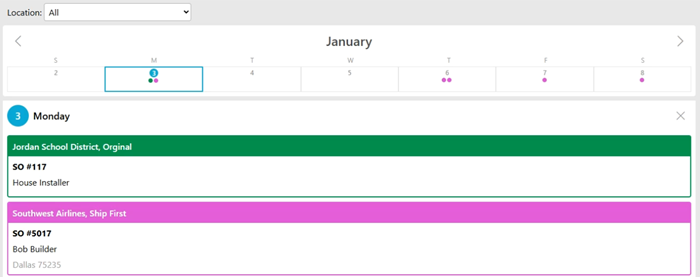
Installer View
Installer View shows a calendar view to your installers, and allows them to see their schedules from their phones. Installer View pulls the scheduled install date from QFloors and displays it on their calendar. They can then click on it to see a basic overview of the job and some additional notes. The administrator sets up each installer with a login and color code, ensuring they only see their own schedule. Installer View can be used with or without QSched.
Account View
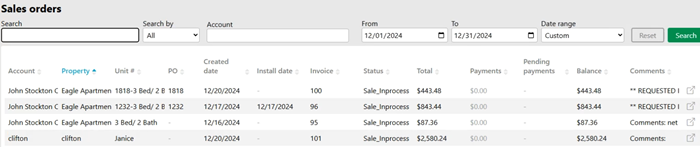
Account View is a dedicated portal for your customer accounts, allowing repeat customers to easily access their sales order history, balances, and payment details. The administrator sets up a unique login for each customer, granting them secure access to view a comprehensive list of their sales, filter the data, and dive into detailed information as needed.
QOrders
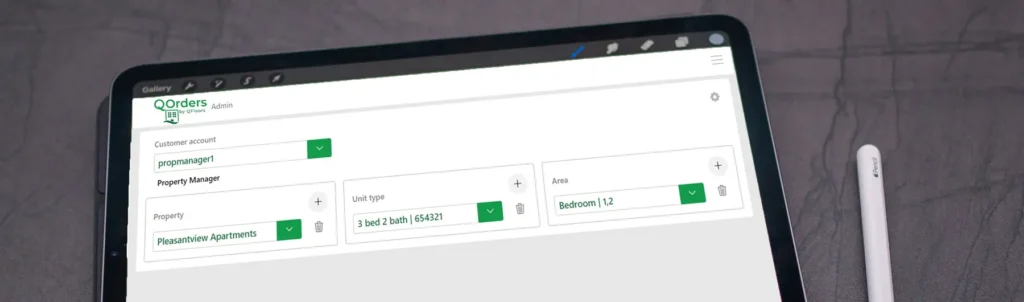
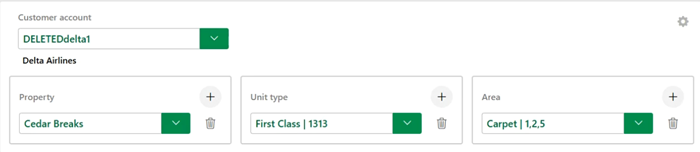
For those who work with multi-family customers, QOrders is a portal that you can set up for your property managers to fill out their orders online. Those orders are then downloaded into QFloors as sales orders, ready for processing. The administrator simply creates a few order templates, and from there, property managers can quickly fill out and submit requests through their personalized QOrders portal.
QLeads
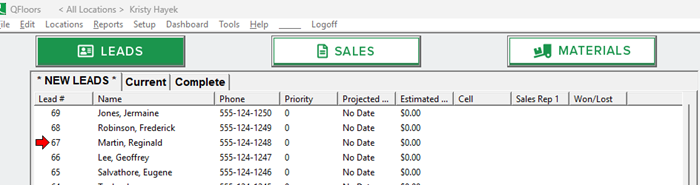
QLeads downloads internet leads into the QFloors Leads screen from your website, CRM, or room visualizer. Once leads are downloaded, you can assign them to your sales team for timely follow-up. The Leads screen serves as your command center for tracking potential customers—view lead history, assign tasks, leave notes, check out samples, and generate lead status reports to see what’s driving traffic. It’s everything you need to stay organized and turn leads into sales.
QTagger
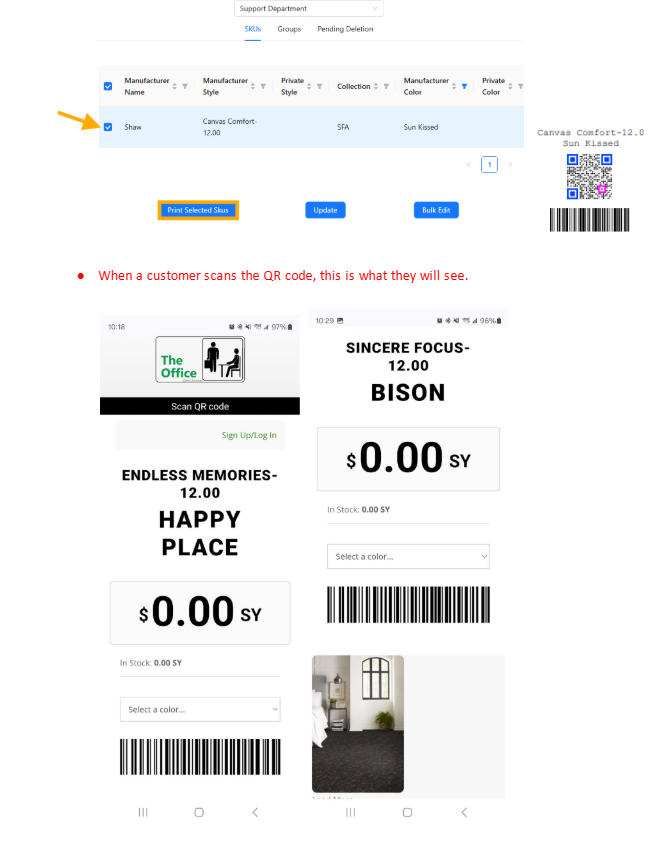
QTagger offers a smarter, more automated way to keep your showroom pricing up to date. Easily print and display QR codes or electronic price tags that customers can scan to view real-time pricing. These QR codes pull directly from your QFloors product catalog and update automatically—so there’s no need to constantly retag your showroom.
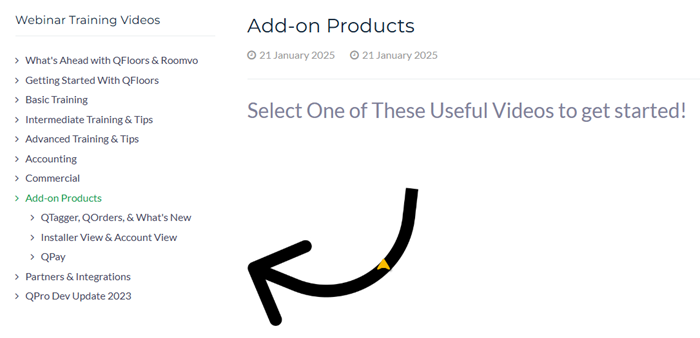
This is just a brief overview of these exciting new products. Check out our latest webinars for more information about each new product. And of course, give us a call if you have questions.
Business Management
6 Strategies for Business Growth & Sustainability

By Jim Love | Director of Client Success
At QFloors, your success is our mission. We understand the unique challenges you face as a flooring business, and we’re here to help you overcome them. Our innovative flooring software is designed to streamline your operations, boost your efficiency, and give you the tools to grow your business with confidence.
But we offer more than just software – we’re your partner in success. From the moment you join the QFloors family, we are dedicated to supporting you every step of the way. Success in business isn’t just about launching—it’s about sustaining momentum and driving growth over the long haul. For businesses already in operation, staying competitive and thriving requires a focus on refinement, innovation, and adaptability.
Here are some key strategies that can help take your business to the next level:
1. Ask Yourself: “What’s My Mission & Does It Need To Change?”
Your original mission may still hold true, but business environments change. We recommend a periodic review of your goals while making the necessary adjustments to align with market trends, customer needs, and new emerging opportunities. A refreshed vision ensures your business stays relevant and inspired to the community around you.
2. Strengthen Customer Relationships
Existing customers are your greatest asset. Focus on deepening relationships by offering exceptional service, and gathering feedback. Feedback is key, as this allows you to be aware of how you are actually doing and what you can do to develop and improve. Happy customers often lead to repeat business and an unlimited amount of valuable referrals.
3. Empower Your Team to Power Your Growth
Your employees drive your success. Provide opportunities for growth if possible, and foster a friendly, happy, and positive work culture. Make sure there is clear communication of goals and expectations. A properly trained, motivated, and skilled employee can significantly boost performance and innovation.
4. Review, Refine, and Revise your Operations
When you invest in QFloors, we like to say: “Get ready to take a closer look at how your business runs—and to start planning improvements that can make a big difference.”
I’ll be the first to tell you—change isn’t easy. In fact, it can be downright uncomfortable. But it’s the only way to really drive growth and results. Our team highly encourages that you make time to examine your business processes to identify inefficiencies or outdated practices.
Are there ways you could be streamlining operations and leveraging technology with:
- QFloors’ add-on products (QReporter, QSched, QTagger, Installer View, QPay, etc.)?
- Our professional training services? (On-Site Training, Premium Implementation, Virtual On-Sites, Accounting Services, Account Balance Beginning Entry, Intermediate Trainings, Users Conference, etc.)?
- Solutions from our service partners that integrate with QFloors (Roomvo’s websites and visualization tools, Measure Square’s estimators, Patriot’s payroll, Swell’s customer messaging solutions, etc.)
These tools, services, and partners are designed to help you get the most out of your QFloors software—boosting productivity, lowering costs, and elevating the customer experience to new heights. While change can be tough, approaching it with an open mind, a bit of effort, and a few thoughtful adjustments can lead to something truly rewarding.
5. Build a Culture of Resilience and Adaptability
Economic shifts, technological advancements, and industry disruptions are inevitable. Stay prepared by building a culture of adaptability and being open to change. Businesses that pivot quickly in response to challenges often emerge stronger.
6. Lean on the Industry’s Best Support Team
Our client services team is widely recognized as the best in the flooring industry—and for good reason. Whether you’re managing day-to-day operations, facing a technical issue, or simply looking to get more out of QFloors, we’re here for you.
We know how important accuracy and efficiency are in your business, which is why we prioritize fast, knowledgeable, and personalized support. Our goal is to empower you to use the software with confidence, so you can spend more time growing your business and less time worrying about tech. Whatever the challenge, we’re just a call, chat, or email away.
Final Thoughts
Success isn’t just about reaching a financial goal—it’s about building a business that stands for something. When your company aligns profitability with purpose—whether by giving back to your community, supporting your team, or contributing to the industry—you build loyalty, trust, and long-term resilience.
Thriving in today’s world requires more than smart systems. It takes relationships, innovation, and a commitment to continuous improvement. Stay connected, stay forward-thinking, and your business will not only grow—it will endure.
B2B
Have You Watched Our Latest QFloors/QPro Webinars?

By Aerin Packard | Director of Marketing
With our recent merger/acquisition with Roomvo, 2025 is already shaping up to be a milestone year for QFloors. But we’re just getting started! There’s still plenty to look forward to, including (but not limited to) the upcoming 25th anniversary users conference cruise and the eventual release of QPro Accounting.
Earlier this year, we hosted two webinars packed with valuable insights for those wondering about the future of QFloors and QPro. If you haven’t seen them, I HIGHLY encourage you to take the time to listen to them.
QTagger, QOrders, & QPro Accounting Webinar
During January’s webinar, QFloors CEO Chad Ogden went over all our newest products coming out in 2025. You can find it on our support site under Training Videos > QFloors Webinars > Add-on Products > QTagger, QOrders & What’s New. Alternatively, the video is available on YouTube, complete with time codes in the description for easy navigation to specific sections.
I’m going to put a few shortcut time codes below for sections you might be interested in:
- 00:08:54 – Introducing QTagger (QFloors’ integrated electronic tags & QR codes for showrooms)
- 00:32:18 – Quick Overview of the New QOrders (customer website portal for multi-family dealers)
- 00:57:15 – QPro Updates (the latest updates on QPro Accounting timeline and beta testing)
- 01:02:50 – Will QPro Be Available to Everyone?
- 01:04:34 – Will There Be a Way to Convert Seamlessly from QFloors to QPro?
- 01:13:49 – Quick QPro Demo
- 01:25:38 – Will QFloors Be Phased Out Once QPro is Out?
- 01:31:11 – When Can Customers Switch Over From QFloors to QPro?
QFloors & Roomvo Webinar
As you may know, earlier this year we announced the merger between QFloors and Roomvo. We understand this brings many questions, so last month, QFloors CEO Chad Ogden joined Leap Tools CEO Pawel Rajszel for a webinar. They provided an overview of Roomvo, its offerings, and what this partnership means for our customers. They also addressed key questions and shared insights into future plans, including QPro Accounting.
You can find this webinar on our support site under Training Videos > QFloors Webinars > What’s Ahead with QFloors & Roomvo. The video (along with time codes) is also available on YouTube.
Again, here are a few chapters / time codes you might want to check out:
- 00:04:46 – “About Roomvo” presentation by Pawel Rajszel
- 00:34:36 – What are the Tools for RSAs?
- 00:36:46 – When do I need to move over to QPro?
- 00:38:29 – Will there be a way for customers to digitally sign a proposal?
- 00:39:47 – Where can I learn more about RSA tools?
- 00:52:18 – Will we be charged more for QFloors/QPro?
- 01:00:03 – What is the main difference between QFloors and QPro?
- 01:25:06 – Is the Roomvo technology being offered to current QFloors customers?
- 01:26:26 – Can a Broadlume visualizer be converted to Roomvo?
- 01:31:58 – How hard is it to convert to a Roomvo website?
- 01:33:01 – How are leads uploaded from Roomvo to QFloors?
We’re excited for all that’s ahead and look forward to bringing you more valuable webinars in 2025. If you have a topic you’d like us to cover, feel free to email us at support@qprosoftware.com —we’d love to hear your ideas! Thanks for being part of our community, and we can’t wait to connect with you in future sessions.
B2B
Latest fcB2B Updates You Need to Know

By Todd Smith | B2B Manager
As a member of the fcB2B organization, QFloors collaborates with manufacturers, contractors, suppliers, distributors, and software vendors to drive industry innovation. We are committed to advancing the flooring industry through the integration of B2B and Web Services technology.
If you’re new, you can visit our B2B webpage to learn more about these features and capabilities.
On our support website, you’ll find a list of vendors currently B2B certified with QFloors. Each vendor has a dedicated link providing further details on how to communicate with them, as well as the current fcB2B documents they are certified for.
See the Full B2B-Table here.
I’m excited to share that QFloors’ list of certified vendors and manufacturers continues to expand. We’ve received great feedback from customers eager to leverage this technology with as many of their suppliers as possible, and we’re committed to adding even more to the list.
Here’s a list of the most recent vendors to be certified
Other important notes/updates for customers using fcB2B
- Mannington recently transitioned all their accounts to a new server and updated their B2B credentials.
- Daltile has certified fcB2B for version 3.2 and is in the process of transitioning all accounts to their new v3.2 price catalog.
- All Surfaces has a new EDI system.
- Surface Art is completing a new EDI system.
The following vendors are in pre-certification stages with QFloors
- EJ Welch (SFTP)
- Genesee Ceramic Tile Distributors
- Crossville Studios (SFTP)
- RW Supply (SFTP)
- Conestoga Ceramic Tile (SFTP)
- Cain and Bultman, Inc.
- Robert F. Henry Tile Company, Inc.
- International Flooring Company
Please note that for security purposes, the following vendors require a static IP address:
- Arley Wholesale, Inc.
- Pacific Mat
- T&A Supply
- Surface Art
- Hank’s Specialties
- Radio Distributing
- WC Tingle Flooring
(If you are on QCloud, this doesn’t apply. But if you aren’t on QCloud, you can talk to your IT department about what this means.)
Please reach out to us if you have any questions on the information above, or if you’d like to learn how B2B/EDI and Web Services can help save time, lower stress, and boost profits. We’re more than happy to help you get started.