








Edition #26
QFloors is Bringing More Products to the Table
This year we have already released a couple of new products to the QFloors family, and more are coming.
Starting at the first of 2024, we added Installer View. This product allows installers to see their upcoming jobs on their phones. Quite a few of our customers have implemented this product for at least some of their installers, and are using it every day.
During the summer we then added Account View, which allows your repeat customers to see a history of all of the orders they have placed with you, along with the current status of their orders. They can see information such as the installation date and the remaining balances on each order via a webpage they log into.
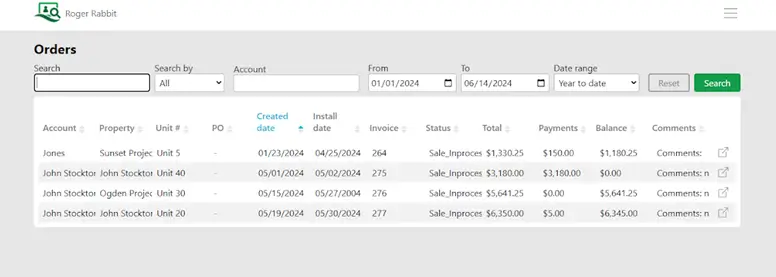
Well, here we are in December, and we are ready once again to announce a product that will be useful to some of you. QOrders has been a project we have worked on over the years. It kind of got pushed to the side and put on hold for a time, due to other things we were working on, like QPay. But as we have put most of the finishing touches on QPay (By the way, about 1/3 of our QFloors customers have adopted QPay in just 3 years!), we have found renewed interest in our QOrders project.
What is QOrders?
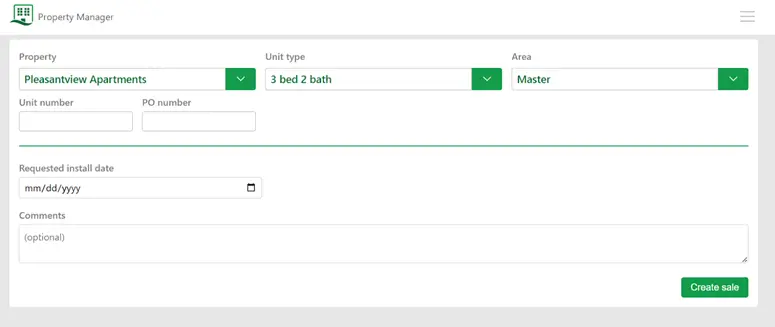
This is a product that could be really helpful in the multi-family housing and new home builder sectors. So property managers for apartments, dorms, hotels, etc. would find this tool useful. QOrders streamlines the process of ordering between the property manager and flooring dealer. For example, let’s say that we have an apartment complex called Raintree, and every day you have tenants moving in and out. Sometimes the flooring needs to be replaced upon departure, and it would be useful if the manager could go to a website, place the order and then it just shows up in QFloors without them calling on the phone or sending an email. QOrders could also be useful for a builder that is constructing the same type of homes over and over.
If you have looked at QOrders in the past, we have done a complete overhaul, so it is entirely new. You need to take a fresh look. This is a pretty awesome product for dealers doing this kind of business.
More to Come!
Lastly, I am going to say that we have another new product that we will be announcing in the coming weeks. I am going to keep it secret for now, because we are just finalizing our testing. But let me just say, we are really excited for this one and anyone with a showroom with samples will benefit from this product. Details will come before the end of the year. I think you’re going to love it.

Save Yourself Time and Money: 3 Tips For You As You Wrap Up Your Year-End Accounting
One of our main goals at QFloors is to help you have accurate financial statements. Here are some simple steps you can take to help with that accuracy.
1. Close the General Journal (Close Period)
We recommend closing the general journal monthly, but if you’re not doing that, you must at least close the journal when you submit financial statements to your accountant. This ensures that the year-end balances in QFloors remain consistent with the data you provided to your accountant.
Why is this critical?
Let’s say that you don’t close the journal as of 12/31/20xx. Almost certainly, someone in your company will create a new transaction, or change an existing transaction, that is dated in that prior year. Those 12/31 balances will then be different from the balances you submitted to your accountant. They’ll prepare and file your tax returns based on the balances you sent them, but your QFloors system will have different balances. That will trickle down to each subsequent year’s ending balances. For each of those subsequent years, you’ll be giving your accountant incorrect balances from QFloors because you allowed the balances to be changed by not closing the journal when submitting financials to your accountant.
Another simple thing you could do to make sure your financials are correct is to verify with your accountant that your QFloors balances match their balances for the most recent year for which tax returns have already been filed. For example, if you’re working on 2024 taxes now, you would verify that your 2023 balances are still correct. You could either send to them the financials from QFloors for that year, or you could compare the QFloors balances for that year to the after-tax financials and/or tax return that you received from them.
If your financials in QFloors don’t match the official balances, when it is eventually discovered, the remedy is to have another general ledger (GL) conversion done, where the QFloors balances are adjusted to match the accountant’s official balances as of the most recent tax return. We charge $200 per hour to do that for you, or you can have your accountant do it, but they will most likely charge more than that. These typically take 1-1/2 to 2 hours to do. Reach out to support@qprosoftware.com if you’re interested in these services.
2. Pay Attention to Any Needed Adjustments As Your Accountant Works on Your Income Tax Return
As you and your accountant review your financials together, pay attention to any adjustments that they may mention are needed, and if there are, make sure you enter them into QFloors. Ask them along the way if there are adjustments you can or should make immediately.
Why is this critical?
The reasons are exactly the same as what I outlined above. Not entering these adjustments means your financials in QFloors are incorrect, and that will pass down to each future year until you fix it.
After making the corrections, if you opened the period, be sure to close the journal again as of the most recent date that you can. Remember, we strongly recommend closing monthly, so if you’re making these corrections in April, for example, you should be re-closing the journal as of 03/31/20xx.
3. Enter Adjustments into QFloors After Your Income Tax Return Has Been Filed
After your accountant has completed your income tax return, you should follow up with them to make sure you receive from them any adjusting entries that should be entered into QFloors (interest expense, depreciation, etc). Then create a journal entry in QFloors for those adjustments (see How to Create a Journal Entry).
Why is this critical?
Again, the reasons are the same. It’s to make sure your QFloors system balances match the official balances.
Too often I have to perform a GL conversion for customers who previously had one done, but neglected these simple steps at tax time. As a result, they’ve reported incorrect balances for each year in between.
It’s often the small and simple things that make a big impact. I hope you see the time and money saved by taking a few minutes to: 1) close the general journal when submitting financials to your accountant, 2) communicate with your accountant to gather all necessary adjustments, and 3) enter those adjustments into QFloors.
Intermediate Trainings to Sharpen Your QFloors Knowledge
Let’s be honest: with QFloors’ wide range of features, products, integrations, and services, it can sometimes feel overwhelming. If you’re looking to learn how to utilize QFloors on a deeper level, our intermediate trainings are a great resource.
What is an intermediate training?
Our intermediate trainings are one-day trainings that go into depth on more advanced features in QFloors. Attendees will learn about more sophisticated options, shortcuts, features, and integrations. At the end of the day, a Q&A session will be available to answer any other questions you may have.
Who are these intermediate training for?
These trainings are intended for users who are already using QFloors on a day-to-day basis. So if you’ve been using the software every day for at least a few months, this would be a great training for you to attend. Note that these trainings aren’t designed for brand new users, nor are they designed for people wanting super advanced training (ie: project management).
If you are a newer customer who wants to learn more of the basic setups and essentials of QFloors, our free* 2-day basic trainings in Salt Lake City would be a great option. You can visit the events page on our website to see when the next basic trainings are.
*Doesn’t include travel expenses.
When are the next intermediate trainings?
Currently, there are two intermediate trainings that you can sign up for right now. Typically we try to hold these trainings in conjunction with tradeshows for your convenience.
Intermediate Training at the SFN Convention
Jan 22, 2025 | 9am – 4pm
Rosen Shingle Creek, Orlando, FL
*Open to QFloors customers attending SFN Convention
Cost: Free
Register here
Intermediate Training at TISE/Surfaces
Jan 30, 2025 | 9am – 5pm
Mandalay Bay North Convention Center, Las Vegas, NV
*Open to anyone – you don’t have to go to the show to attend
Cost: $200 per person
Register here
How far in advance do I need to register for an intermediate training?
We’ve listed deadlines on the event page on our website. But typically, we would like to have your registration a few weeks before the event so we can plan accordingly.
What’s the refund/cancellation policy?
If you cancel 30 days or more before the event, you’ll receive a full refund. Refunds will not be issued in full for cancellations made less than 30 days before the event.
In the case that the training has to be cancelled due to low attendance, you will receive a full refund.
If you have any questions about our trainings, don’t hesitate to reach out to billing@qprosoftware.com. If you can’t make it, don’t forget we also have our users conference coming up later in 2025.
We hope to see you next year!
Join us on our 25th Anniversary Cruise to Alaska!
QFloors is celebrating 25 years in business, and to mark this great event, we wanted to host the best Users Conference ever! So we’re sailing to Alaska!
We wanted to do something unique, and unforgettable, while still providing the incredible training, networking, and collaboration opportunities that a QFloors Users Conference brings.
We had hoped to have everything solidified and priced out by the time this QNews was published, but unfortunately we are still waiting for confirmation from the cruiseline. So we will share the dates, ship, itinerary, etc. as soon as that happens.
On this 25th Anniversary “celebrate-and-train-with-us” 7-day cruise, we’ll experience the breathtaking scenery of the Inside Passage, the Tracy Arm fjord, and Glacier Bay National Park. We’ll also be visiting sites like Juneau, Skagway, and Ketchikan.
During down times, we’ll provide software and business training that will help you run a better, more efficient operation. You’ll have the chance to exchange ideas with other dealers, learn about the latest features, integrations, and products of QFloors and QPro, and learn best practices (for the software and your business.) Note that Users Conferences are for customers already using the software on a daily basis. For basic training opportunities, see this web page.
This tax-deductible business training will truly be a special experience, and having you there with us will make it even better!
So write it on your calendars, and watch for more information and registration to come soon!
The Power of Relationships in the Flooring Industry
This year, QFloors proudly marks a milestone—our 25th anniversary. Over the past quarter-century, we’ve seen countless changes in the flooring industry, but one thing has remained constant: relationships are the heart of it all. As we reflect on our journey, it’s clear that the connections we’ve built—with our team, customers, and partners—are the foundation of our success.
In the flooring industry, many businesses are more than just companies; they’re legacies. Family-owned and multi-generational businesses define much of the industry, creating a unique blend of tradition and trust. From father-daughter teams to lifelong partnerships, these relationships aren’t just professional—they’re deeply personal.
At QFloors, we’ve shared that experience. As a business that’s been family-owned from the start, we understand the value of working with loved ones and navigating the joys and challenges of growing together. It’s a connection we share with our customers, many of whom have trusted us from the beginning to support their families and grow their businesses.
This sense of community resonates through our team and our customer relationships. Whether we’re guiding new customers through their first demo or supporting long-time clients with innovative solutions, we aim to cultivate genuine partnerships. We take pride in being more than a vendor; we strive to be a trusted resource and advocate.
As we look to the future, our commitment to relationships remains steadfast. Here’s to the next 25 years of connection, collaboration, and community. From our family to yours, thank you for trusting us to be part of your story.
Also, if you’re interested, I have a free, 5-step guide that goes over how to make and keep meaningful relationships in business. If you’d like this free resource, please email me at colten@qprosoftware.com.
Successful Implementation is Key!
Does implementing QFloors seem daunting? Fear not! Over the years, we have helped hundreds of businesses successfully implement QFloors into their operations. Here are some key recommendations, common misconceptions, and available training options that will be useful to you.
Key Recommendations
- As you begin implementing your software, you must be prepared to evaluate your business systems, policies, and procedures.
- You must also be open to adjusting your processes as you learn how to leverage the software to increase your business’s profitability.
- Be sure to have a detailed road map of your plan along with goal dates and deadlines.
- Set realistic, achievable goals with clear expectations, allowing adequate time for setup and implementation. If you are unsure if a goal is realistic, we can talk you through it.
- Stay persistent, but avoid rushing; effective setup and execution are critical to a smooth, successful transition. If you get stuck, you can always call client services to assist you.
Common Misconceptions
Below are some common misconceptions about implementation:
Implementation is a One-Time Event & Has to Get Done Now
Implementation is an ongoing process that requires regular updates, training, and support, rather than a one-time setup. It is important not to be in a hurry, and that you work frequently and often with our Client Services team, calling in with any questions you may have. We are always here to help!
If you don’t take the time to do it right, when will you have time to do it over?
John Wooden
Software Alone Solves Problems
While software can optimize processes, it’s not a silver bullet. QFloors is a powerful tool that can save time and boost profits, but it’s not going to immediately fix everything the minute you purchase it. Success depends on how well you trust and work within the QFloors system.
Trust the process…..Just do the work and the results will take care of themselves.
Tony Gaskins
Training is Optional
Tinkering, or playing around in the software is not training. It’s vital to not just buy QFloors, but to learn how to use it. There are various training options to ensure your employees effectively learn how to utilize the software. Read the section below to see what is available to you and your team.
For the best return on your investment, pour your investment into your head.
Benjamin Franklin
Available Training Options
As stated above, proper training is an important key to successful software implementation, especially with a comprehensive system like QFloors. Proper training prepares your team with the knowledge they need to fully utilize the software’s capabilities, and drive greater efficiency in day-to-day operations. When you make time for training you can reduce errors, minimize downtime, and boost confidence, allowing your team to navigate the system with ease. It allows for a smoother transition, and translates into a faster return on your investment.
- Call QFloors’ client services. Please take advantage of the best client services team out there to assist you with your implementation. Our hours are Monday through Friday from 8am to 5pm Mountain Time.
- Schedule a training appointment. If you feel you need a little additional training, we have the ability to schedule appointments. We offer one hour of uninterrupted time with a QFloors trainer to help guide you through basic training, or whatever you might need additional assistance with. Please reach out to our Client Services team at 801-563-0140 Option 2 for more information.
- Look at our additional training services. Additional paid services are also available at any time. Our internal experts are trained to educate others, ensuring long-term, sustainable knowledge to help you in your transition. We offer Premium Implementation, Virtual Training, and Onsite Training with our experienced team of Implementation Consultants. You can contact Client Success Sales Consultant Paxton Johnson, who can speak with you about your business and fit you with the best implementation and training options for you.
Implementation is a process that requires careful planning and execution across several different stages. By understanding these stages, avoiding common misconceptions, making the commitment to change, and selecting the appropriate training options, you can maximize the benefits of your new software system. We promise that effective implementation will not only enhance your operation, but will ensure long-term success for your business.
B2B News & Web Services
As a key member of the fcB2B organization, QFloors is dedicated to advancing the flooring industry through innovative B2B technology. There are a few updates that I wanted to share with you regarding QFloors’ B2B features:
V3.2 Certification
We’re happy to announce that QFloors is one of the first companies in the industry to be certified with the fcB2B organization’s new v3.2 software update. This update will help us to continue to move the technology forward, and does not take anything away from our current B2B features and functionality.
Web Services
Web Services represents the latest advancements in B2B flooring technology, offering cutting-edge electronic communication with participating suppliers. This innovative system allows you to send inquiries and receive immediate responses in real-time. For example, you can check inventory levels (“How much stock do you have of this?”), look up related items (“Which glues and trim pieces go with this item?”), track order statuses (“Is this item back-ordered?”), confirm current product pricing, or even reserve items in advance.
Here is a list of what you can request/track with Web Services:
- Stock Check w/Quant (SCQ)
- Stock Check (SC)
- Related Items (RI)
- Order Status (OS)
- Price Check (PC)
- Reservation Service (RS)
I’ve also provided below a list of vendors currently certified to offer various Web Service features and capabilities. For a detailed breakdown of what each vendor provides, click the link below:
- Adleta
- BPI
- Buckwold Western
- Elias Wilf Corporation
- Engineered Floors
- Herregan Distributors
- Jaeckle Distributors
- JJ Haines (UCX)
- Louisville Tile
- Mohawk Industries
- Ohio Valley Flooring
- Shaw Inc
- WC Tingle
- Virginia Tile
- William M Bird
Don’t miss out on all the tremendous benefits of B2B/Web Services. Here at QFloors, we’re ready to help you through implementation, one step at a time. Please contact us and we can help you get set up, or answer any questions you might have.